
WhatsApp Business Download (2026) – 10 Powerful Features for Smarter Business Communication on Android
Just Now
9.5 MB
V7.1
Andriod +
50M +
Description
WhatsApp Business is a communication application designed to help small businesses connect with customers more easily. It provides a familiar messaging experience while offering additional tools that make everyday business communication more organized. Businesses can use it to answer customer questions, share product information, provide updates, and build stronger relationships with their audience.
In today’s digital world, customers often prefer quick and convenient communication before making a purchase. WhatsApp Business helps businesses respond to these expectations through features such as business profiles, product catalogs, automated messages, and quick replies. Whether someone runs a small online store, a local shop, or a service-based business, the app offers practical ways to manage customer conversations.
What Is WhatsApp Business and How Does It Work?
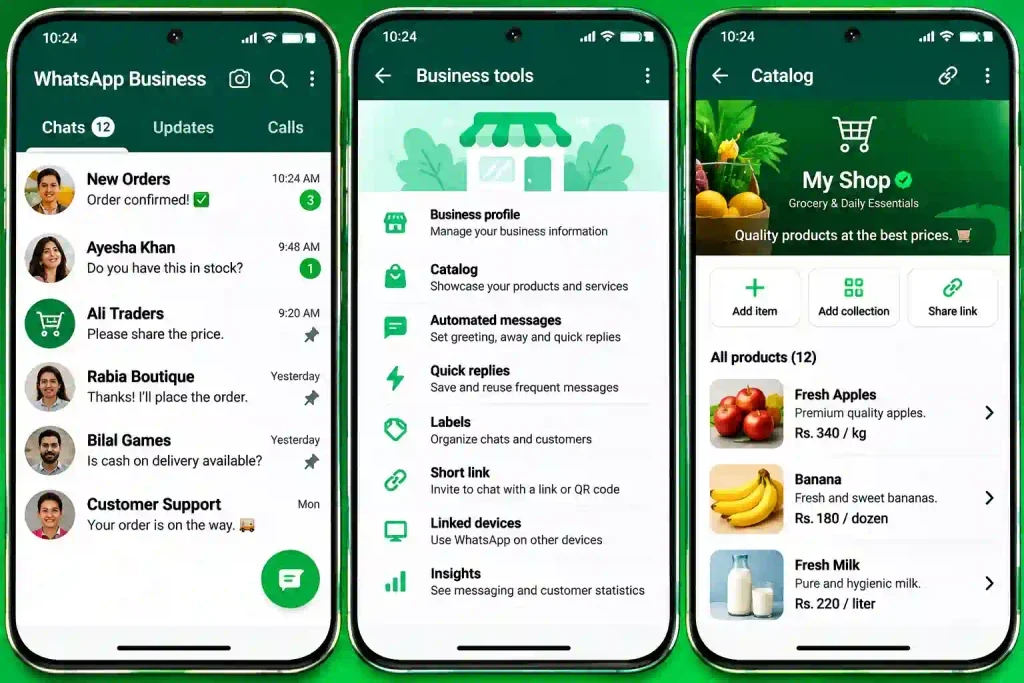
WhatsApp Business is a free messaging application developed by Meta for businesses that want to communicate professionally with their customers. It includes standard WhatsApp messaging features along with business-focused tools. Users can create a business profile, display their products or services, organize conversations, and send helpful information directly to customers.
The app works through an internet connection and uses a registered phone number to manage business conversations. Customers can contact a business through its phone number, QR code, or short link. Business owners can reply manually or use available messaging tools to handle common questions and customer requests. Some advanced features depend on the account type, region, and available services. You can visit the website Apkmoz
Getting Started with WhatsApp Business – Account Setup and Registration
- Download WhatsApp Business from the Google Play Store or Apple App Store.
- Open the application and accept the required terms.
- Enter your business phone number.
- Verify the number using the verification code.
- Restore an eligible existing chat backup if available.
- Add your business name and profile picture.
- Complete the basic business information.
- Review privacy and notification settings.
Exploring the WhatsApp Business Home Screen
- Chats: View and manage customer conversations.
- Updates: Share and view business Status updates.
- Calls: Communicate with customers through supported calling features.
- Business Tools: Access catalogs, automated messages, and other business features.
- Search: Find specific conversations and messages.
- New Chat: Start a conversation with a customer.
- Settings: Customize account preferences and privacy options.
Creating a Professional Business Profile
- Add your official business name.
- Upload a recognizable business logo.
- Write a clear business description.
- Select the appropriate business category.
- Add your business address if applicable.
- Include your email address and website.
- Set your regular business hours.
- Keep profile information accurate and updated.
WhatsApp Business Catalog – Showcasing Products and Services
- Add product or service names.
- Upload clear product photographs.
- Include prices where appropriate.
- Write informative product descriptions.
- Add product links when supported.
- Update unavailable products.
- Share individual catalog items with customers.
- Use the catalog to make product discovery easier.
Product Collections – Organizing Your Business Catalog
- Group similar products into collections.
- Create categories for different product types.
- Organize items for easier browsing.
- Use clear collection names.
- Update collections when products change.
- Remove discontinued or unavailable items.
- Make it easier for customers to find what they need.
Quick Replies – Saving Time with Ready-Made Messages
- Create shortcuts for frequently used responses.
- Save answers to common customer questions.
- Prepare standard product information.
- Create reusable pricing messages.
- Save delivery and payment details.
- Use shortcuts to insert saved replies quickly.
- Review and update responses regularly.
Automated Messages – Greeting Customers and Managing Availability
- Set greeting messages for new customer conversations.
- Welcome customers when they contact your business.
- Provide basic business information automatically.
- Let customers know when they can expect a response.
- Customize messages according to your business needs.
- Check automation settings regularly.
Away Messages – Staying Connected Outside Business Hours
- Create automatic messages for unavailable periods.
- Set a message explaining your working hours.
- Inform customers when you will respond.
- Schedule messages according to available options.
- Customize responses for holidays or business closures.
- Keep customers informed when your team is offline.
Labels – Organizing Customers and Conversations
- Create labels for different customer groups.
- Mark new customer inquiries.
- Identify pending orders.
- Track completed purchases.
- Organize payment-related conversations.
- Find labeled chats more easily.
- Use consistent labels to improve workflow.
WhatsApp Business Chat Tools – Managing Customer Inquiries
- Send and receive text messages.
- Share photographs and videos.
- Send documents and product details.
- Share location information when needed.
- Reply to specific customer messages.
- Pin important conversations where supported.
- Search previous messages.
- Manage customer inquiries in one place.
WhatsApp Status – Promoting Products and Business Updates
- Share product photographs.
- Publish short promotional videos.
- Announce discounts and special offers.
- Display new arrivals.
- Share business announcements.
- Post working-hour updates.
- Use text, stickers, and other creative tools.
- Review available Status privacy settings.
WhatsApp Business Broadcast Lists – Reaching Multiple Customers
- Send the same message to multiple eligible contacts.
- Share product announcements.
- Inform customers about new offers.
- Send business updates.
- Prepare targeted customer lists.
- Avoid sending unwanted promotional messages.
- Remember that broadcast delivery depends on recipient settings and other limitations.
WhatsApp Groups – Building Customer Communities
- Create groups for relevant customer communities.
- Share announcements and updates.
- Discuss products and services.
- Answer common questions.
- Set group permissions.
- Add trusted administrators.
- Follow privacy and community guidelines.
WhatsApp Web and Desktop – Managing Business Chats on a Computer
- Open WhatsApp Web in a supported browser.
- Download the official WhatsApp Desktop application if preferred.
- Link your computer using the phone’s linked-device feature.
- Send and receive customer messages.
- Share files and documents.
- Manage conversations using a larger screen.
- Log out from computers you no longer use.
WhatsApp Business Multi-Device Support – Connecting Multiple Devices
- Link supported additional devices.
- Access conversations across connected devices.
- Manage business communication more flexibly.
- Allow team members to assist where account arrangements permit.
- Review connected devices regularly.
- Remove devices you no longer recognize.
- Understand that device limits and features may change.
WhatsApp Business Calls – Communicating with Customers Directly
- Make voice calls through supported features.
- Receive customer calls.
- Use video calls when available.
- Discuss customer requirements directly.
- Clarify product or service information.
- Maintain professional communication.
- Check internet connectivity before important calls.
Click-to-WhatsApp Ads – Connecting Social Media with Customer Chats
- Create advertisements that open a WhatsApp conversation.
- Connect eligible Facebook and Instagram advertising campaigns.
- Add a clear call-to-action button.
- Direct interested customers to your business chat.
- Answer questions from potential buyers.
- Measure campaign performance through available advertising tools.
- Follow Meta’s advertising policies.
WhatsApp Business Short Links and QR Codes
- Generate a business short link.
- Share the link on your website.
- Add it to social media profiles.
- Create a QR code for customer access.
- Display QR codes in physical stores.
- Make it easier for customers to start conversations.
- Update promotional materials when links change.
Meta Business Integration – Connecting Facebook and Instagram
- Connect eligible business accounts.
- Display WhatsApp contact options on supported profiles.
- Use Meta Business Suite where available.
- Manage business communication through supported tools.
- Connect advertising campaigns with WhatsApp.
- Keep business information consistent across platforms.
- Review account permissions and integrations.
WhatsApp Business Insights – Understanding Customer Engagement
- Review available messaging statistics.
- Understand how many messages were sent.
- Check delivered message information.
- Review read-message statistics where available.
- Evaluate customer response patterns.
- Identify communication improvements.
- Use available insights to improve customer service.
WhatsApp Business API and Platform – Advanced Business Messaging
- Support larger-scale business communication.
- Integrate messaging with customer management systems.
- Build automated customer service workflows.
- Use approved business messaging templates.
- Connect chat systems with business applications.
- Manage customer communication through supported integrations.
- Work with an eligible solution provider when required.
- Understand that API and platform services may involve additional costs.
WhatsApp Business Privacy and Security – Protecting Customer Information
- Enable two-step verification.
- Never share account verification codes.
- Use device locks and account security features.
- Review linked devices regularly.
- Control who can view your profile information.
- Avoid suspicious links and unknown attachments.
- Never request unnecessary sensitive customer information.
- Follow applicable data protection requirements.
WhatsApp Business Settings – Customizing Your Account
- Update your business profile.
- Manage notifications and sounds.
- Configure privacy settings.
- Review chat backup options.
- Manage storage and data usage.
- Customize available business tools.
- Check linked devices.
- Update the app regularly.
Advantages and Disadvantages of WhatsApp Business
| Advantages | Disadvantages |
|---|---|
| Easy communication with customers | Requires an internet connection |
| Free app for basic business use | Some advanced services may involve costs |
| Professional business profile | Limited customization options |
| Product catalog for showcasing items | Catalog features may vary by region |
| Quick replies save time | Requires regular message management |
| Automated greeting and away messages | Automation options are limited compared with advanced systems |
| WhatsApp Web and linked devices | Device limits may apply |
| Useful for small businesses | Not a complete customer management system |
| Supports images, videos, and documents | Too many messages can become difficult to manage |
Frequently Asked Questions (FAQs)
Q1. What is WhatsApp Business used for?
WhatsApp Business helps businesses communicate with customers, share product information, manage inquiries, and provide customer support.
Q2. Is WhatsApp Business free to download?
Yes. The WhatsApp Business mobile application is free to download. However, some advanced business services may involve charges.
Q3. What is the difference between WhatsApp and WhatsApp Business?
Regular WhatsApp is designed mainly for personal communication, while WhatsApp Business includes additional tools such as business profiles, catalogs, labels, and automated messages.
Q4. Can I use WhatsApp and WhatsApp Business on the same phone?
Yes, on supported devices, you can use both applications with separate phone numbers.
Q5. Can I create a business catalog on WhatsApp Business?
Yes. You can add products or services with photographs, descriptions, prices, and other available details.
Q6. Does WhatsApp Business support automated replies?
Yes. It offers features such as greeting messages, away messages, and quick replies.
Q7. Can I use WhatsApp Business on my computer?
Yes. You can connect your account through WhatsApp Web or the official desktop application.
Q8. Can multiple people manage one WhatsApp Business account?
Supported linked devices and certain business solutions allow multiple people to access business conversations, subject to account and device limitations.
Q9. What are WhatsApp Business labels?
Labels help organize customer conversations into categories such as new inquiries, pending orders, payments, and completed purchases.
Q10. Can I advertise products through WhatsApp Business?
Yes. You can share product information through chats, Status updates, catalogs, and eligible click-to-WhatsApp advertising campaigns.
Q11. Is WhatsApp Business safe for business communication?
It includes security features such as end-to-end encryption for personal messages and calls, along with account protection options. Businesses should still protect customer information carefully.
Q12. Can I use WhatsApp Business for international customers?
Yes. Businesses can communicate with international customers, subject to applicable account, messaging, and regional restrictions.
Q13. What is the WhatsApp Business API?
The WhatsApp Business Platform provides advanced messaging capabilities for businesses that need integrations, automation, and larger-scale customer communication.
Q14. Can I switch from regular WhatsApp to WhatsApp Business?
Yes. You can move an eligible account to WhatsApp Business. It is important to back up your chats before starting the transfer.
Q15. Is WhatsApp Business suitable for small businesses?
Yes. Its business profile, catalog, quick replies, and messaging features can help small businesses manage customer communication more efficiently.
Final Verdict – Is WhatsApp Business Worth Using?
WhatsApp Business is a practical communication solution for small businesses, online sellers, service providers, and entrepreneurs. Its business profiles, product catalogs, quick replies, labels, and automated messages make customer communication easier to organize. It also provides convenient ways to share product information and respond to customer inquiries.
Overall, WhatsApp Business is worth considering for businesses that want a simple way to connect with customers and build stronger relationships. While it has limitations compared with advanced customer management platforms, its accessible tools make it a useful option for everyday business communication.